Story: The API Is Alive, But /ask Is Failing
One afternoon, the RAG API’s health check was still returning 200, but /ask started throwing 502s across the board.
No code change. No docker-compose change. No Nginx change. No Qdrant config change.
It was fine an hour ago.
The 502 looked like a single bug at first. Eventually it became clear that four stack layers — environment, container, network, and integration — were each failing at a different boundary.
Part 09 walked through the 7 stations of the document side (parsing → raw storage → Postgres metadata → ingestion queue → auth/permission → document APIs → citation viewer). Part 08 wrapped 4 capabilities into 5 query modes; the routing looked strict.
But on the deployment side, the distance between “running” and “production-ready” was much larger than I expected.
This Part walks through 10 real deployment pitfalls, distributed across 4 stack layers:
- Environment layer (2): VM capacity, deploy key
- Container layer (3): env not reaching the container, Compose healthcheck cascading failures, build context bloat
- Network layer (3): Oracle Ingress, Nginx reverse proxy, Cloudflare HTTPS trust chain
- Integration layer (2): Qdrant payload index, production-style smoke test
Each case came from deployment work, and each prevention framework is the pattern I would apply earlier next time.
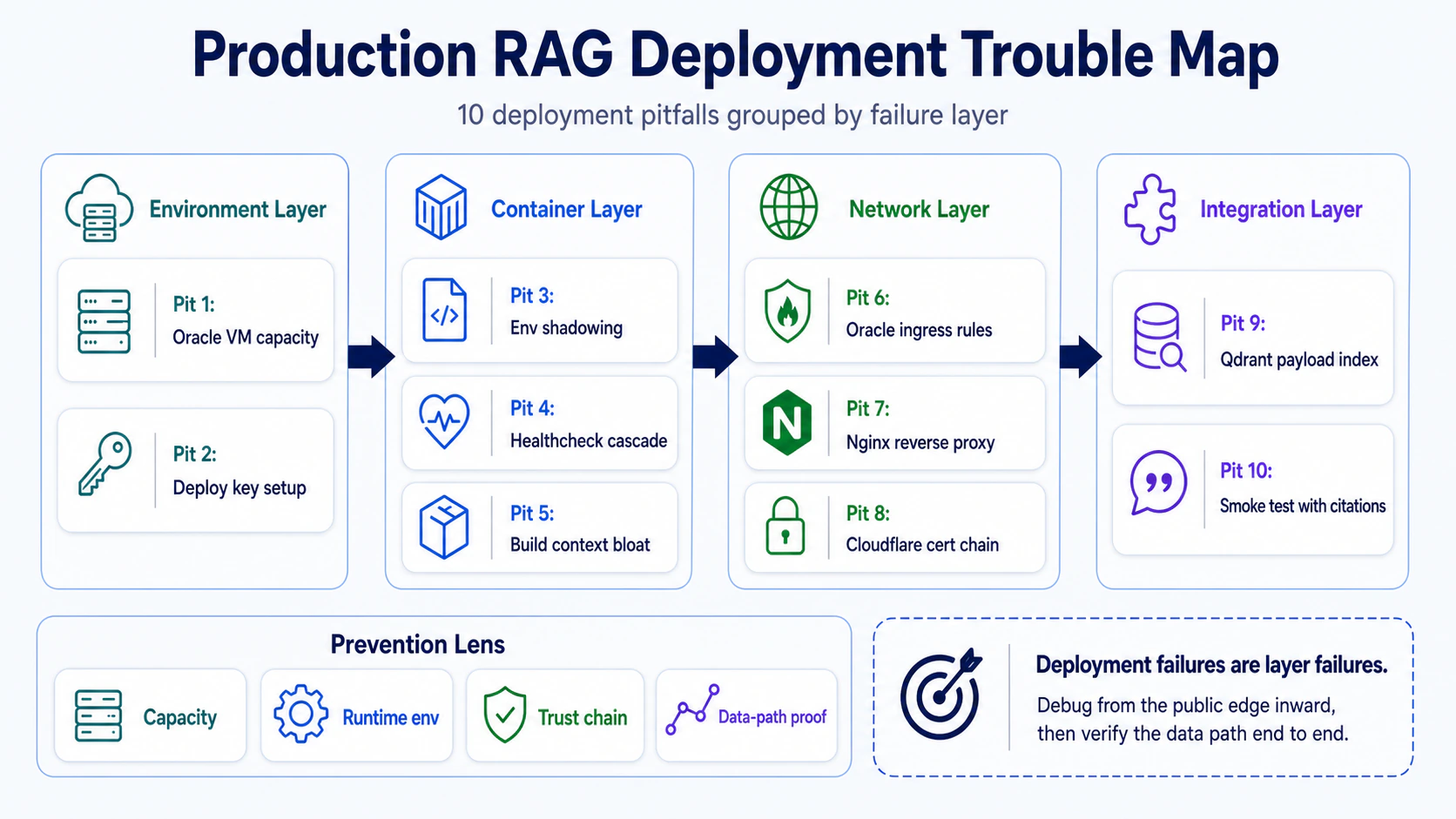
Once the 10 pits are drawn as a map, the article becomes easier to read: this is not a random list of outages. Deployment problems usually mean one boundary was never proven. The environment layer may not have stable capacity, the container layer may not receive runtime configuration, the network layer may have a broken trust chain, or the integration layer may never have proven the data path end to end.
One note up front: 2 of these 10 pits (Pit 4, Pit 5) come from a real deployment cleanup, not from a synthetic checklist. The important part is the operational lesson: a poorly written Compose healthcheck can drag down the entire stack, and no article warned me about this before I hit it myself.
Version note: deployment commands age faster than architecture. Treat Docker, Cloudflare, Qdrant Cloud, and hosting examples here as tested operational patterns; before copying a command into production, check the current provider docs and run it in a staging environment first.
First Line: Environment Layer
Pit 1: Oracle VM Can’t Grab an Always Free Instance
Oracle Cloud’s Always Free plan offers up to 4 OCPUs and 24 GB RAM on ARM Ampere A1 shapes (you allocate 1/2/3/4 OCPUs + matching RAM yourself—not a fixed 4+24). Sounds like plenty for a small RAG API.
First reality check: capacity is not always available when you need it.
Popular regions (us-ashburn-1, us-phoenix-1) return a very quiet error:
{ "code": "InternalError", "message": "Out of host capacity." }You didn’t do anything wrong. This is Oracle’s resource scheduling for Always Free quotas—paid users get priority in high-demand regions.
Real deployment note: this case came from cycling through multiple Oracle regions, waiting, retrying, and eventually securing a usable Always Free node.
Prevention framework:
- Don’t just take the default region—check current load before you start
- Evaluate non-popular regions (ap-seoul-1, ap-tokyo-1) for latency to your actual users
- Rehearse the “grab a new instance” flow once before you need it—the moment you need it is never a calm moment
Personal choice (not general advice): For personal projects or small prototypes, Oracle Always Free’s specs and zero cost are reasonable. But if you need 99.9% SLA, or your team can’t absorb resource volatility, this isn’t the right VM for you.
Pit 2: GitHub Private Repo + Deploy Key Misconfiguration
The most frequent auth failure from localhost to VM: wrong deploy key format, missing SSH config line, git clone keeps asking for a password.
Where deploy keys commonly break:
- Deploy key added to personal SSH keys instead of the repo’s Deploy keys list
- Wrong key format (ED25519 vs RSA—fingerprint comparison fails because of format mismatch)
.envnot in the repo, so the cloned repo on VM has no.env—production env didn’t travel with the code
Real deployment note: this section condenses deploy-key failures where a single broken SSH handshake step made
git clonefail on the VM.
Prevention framework:
- Use
ed25519for deploy keys (shorter key length than RSA, faster signing, currently the cryptographic community’s recommendation) - Never put
.envin Git—make a.env.exampleas the template, manage VM env separately (encryptedscptransfer, or Docker secret/env-file) - After first clone, verify
.envexists before runningdocker-compose up
Second Line: Container Layer
Pit 3: env Variables Don’t Reach the Container (Shadowing / Build-time vs Runtime)
The single most common Docker + FastAPI deployment failure: API key works locally, gets 403 in production.
Technical background (verified):
ARGis only usable duringdocker build; it’s not available once the image is packaged and the container startsENVsurvives both build and runtime in the containerdocker-compose.yml’senvironment:block is runtime injection, not written into the image.envfile auto-interpolates ondocker-compose up, but if you use--env-filespecifying a path, that path is relative to the execution directory, not the compose file location
Real deployment note: this pattern came from a deploy where a port conflict and missing runtime environment variables appeared during the same production-debugging session.
Prevention framework:
Any API key, secret, production parameter must satisfy all three simultaneously:
- Present in the
.envfile - Declared in
docker-compose.yml’senvironment:block (or viaenv_file:) - Has a corresponding field in FastAPI’s
Settingsclass (QDRANT_URL,SUPABASE_URL, etc.)
After first deploy, run inside VM:
docker exec <container> env | grep QDRANTVerify the key actually made it in.
Side note:
python-dotenv’s.envdoesn’t readexportprefixes by default. Format should beKEY=*** (notexport KEY=***`.
Pit 4: Compose Healthcheck Dragging Down the Entire Stack
This is the most under-appreciated pit in the whole series.
One day Qdrant clearly had logs saying it started:
Qdrant HTTP listening on 6333But the entire docker-compose stack didn’t come up, and api/worker never started. The error looked like this:
Container llamaindex-demo-qdrant Error
dependency qdrant failed to start
dependency failed to start: container llamaindex-demo-qdrant is unhealthy
Was Qdrant dead? No. It was alive. The problem was that the L34 healthcheck used curl inside the container:
healthcheck:
  test: ["CMD", "curl", "-fsS", "http://127.0.0.1:6333/healthz"]
And Qdrant’s image doesn’t have curl/wget. Service is alive, healthcheck tool doesn’t exist, Compose declares it dead, and depends_on: service_healthy blocks all downstream services.
Docker official docs confirm: curl is not present in minimal images (Alpine, scratch) by default—you need to switch to wget, install curl, or use CMD-SHELL with cat / grep for healthcheck.
Real deployment note: this case came from an iterative Compose cleanup where the service was alive, but the healthcheck definition made Compose treat it as unhealthy.
Prevention framework:
- Healthcheck can’t rely on
curlORwgetbeing in the container—minimal images (Alpine busybox) only havewgetby default, and scratch images may not have either; the safest approach is to write a tiny Python / shell healthcheck script - Don’t blindly use
depends_on: service_healthy—if the health definition itself has a bug, it’ll cascade-block all downstream services - Decouple healthcheck from “service is up”: service started ≠ healthcheck passed ≠ downstream can start working
Here’s how I handled it in the L34B patch:
services:
  qdrant:
    # No more internal curl
    healthcheck:
      test: ["CMD-SHELL", "ss -ltn | grep -q ':6333' || exit 1"]
      interval: 30s
      timeout: 5s
      retries: 3
      start_period: 30s

  api:
    depends_on:
      qdrant:
        condition: service_started   # service_started, not service_healthy
Or move health verification to the host side using curl smoke tests, and skip container-internal healthcheck entirely.
Pit 5: 4.31 GB Build Context—Moving the Whole Repo into Docker
Another real record from the L34 series: the first docker compose up --build printed this in the build log:
transferring context: 4.31GBTook 335 seconds. That meant the Docker build context was carrying the entire repository into the build.
The Dockerfile was fine, the image built successfully. But .dockerignore was never written, so:
.venv(Python virtual environment, several GB) shipped instorage/datafolders (test PDFs, intermediate JSON) shipped inmodels(Hugging Face cache) shipped in__pycache__shipped in.gitshipped in
Every docker build repeated a large transfer that did not help the image.
Real deployment note: this case came from a Docker build that succeeded but spent minutes transferring avoidable local artifacts because
.dockerignorewas incomplete.
Prevention framework:
# Minimal .dockerignore
.venv
storage
data
models
__pycache__
.git
.env
*.log
*.pyc
.DS_Store
.dockerignore deserves the same care as .gitignore. It should be in the first commit.
Third Line: Network Layer
Pit 6: Oracle Ingress Rules—which Ports to Open, Which to Keep Closed
Oracle Cloud’s VCN (Virtual Cloud Network) has a Security List layer—this is a subnet-level firewall (not instance-level; instance-level is NSG / Network Security Group). Even if the VM’s internal UFW is correctly configured, external traffic won’t reach the VM if Oracle Cloud’s Security List doesn’t have the right ports open.
Think of the Oracle VM as a building:
Internet → Oracle Cloud outer wall (Security List) → VM's own firewall (UFW) → Nginx → FastAPI containerAn Ingress Rule is “who is allowed to come in through which door.”
Common port tradeoffs:
- 22 (SSH): for logging into the VM from your Mac. Source CIDR can be restricted to “your IP/32” (but if your IP changes frequently, start with
0.0.0.0/0to avoid locking yourself out) - 80 (HTTP): for external
http://<public-ip>/health—browsers use port 80 by default when no port is specified - 443 (HTTPS): for when you have a domain, external traffic goes
https://api.yourdomain.com
Ports that should never be open to the public internet:
- 8000: occupied by the VM’s MCP server at
127.0.0.1:8000; no need to expose - 18000: the internal port mapped for the FastAPI container, used by Nginx inside the VM only; external traffic should only hit 80/443
- 6333 / 6334: Qdrant’s REST/gRPC ports; this project uses Qdrant Cloud (not self-hosted Qdrant), so these ports don’t need to be open on the VM at all
Real deployment note: this case came from a VM where Nginx responded internally, but the public IP did not respond because the Oracle Cloud Security List did not allow port 80.
Prevention framework:
- In Oracle Cloud Console: VCN → Security Lists → Add Ingress Rule, verify destination port 80 is open
- Test in stages: first inside VM
curl 127.0.0.1/health, then from Maccurl http://<public-ip>/health - If VM internal works but public IP doesn’t, the problem is in Oracle Security List, not Nginx
Pit 7: Nginx Reverse Proxy and the Cloudflare HTTPS Trust Chain
External traffic hits your VM through an Nginx reverse proxy before reaching the FastAPI container. Nginx itself needs HTTPS configured, but there are two layers of HTTPS here that need separate handling: Cloudflare ↔ external user (Full strict), and Cloudflare ↔ Oracle VM (Origin Certificate).
Real deployment note: this case came from Cloudflare Origin Certificate setup errors: a certificate/key mismatch and an SSL/TLS mode that had not been set to Full (strict).
The two-layer HTTPS architecture:
External user → HTTPS → Cloudflare (validates your domain certificate)
Cloudflare  → HTTPS → Oracle VM (validates Cloudflare Origin Certificate)
Cloudflare Origin Certificate setup steps:
- In Cloudflare Dashboard → SSL/TLS → Origin Server → Create Certificate
- Hostname:
api.yourdomain.com(not a wildcard—reduces scope) - Choose RSA 2048 (compatible with Nginx defaults). This certificate is valid for 15 years by default (not 15 days)—the biggest difference from a regular LE cert
- Transfer the generated PEM + KEY files to VM at
/etc/ssl/cloudflare/usingscp - Reference these files in Nginx config
- Cloudflare SSL/TLS mode: Full (strict)
What not to do:
- Don’t transfer the origin certificate’s private key over plaintext channels—
scp/sftpgo over SSH (encrypted), so transferring the PEM file itself is fine; but email, plaintext chat, or pasting into an issue tracker are all wrong - Don’t set SSL mode to Flexible—it makes the Cloudflare→origin leg HTTP, exposing you to middlebox interception
Prevention framework:
-
Test the public path from outside with
curl -v https://api.yourdomain.com/health. This verifies the certificate the user sees: Cloudflare’s edge certificate for your domain, not the Origin Certificate installed on the VM. -
Do not use
curl -v https://localhost/healthto validate a Cloudflare Origin Certificate.localhostdoes not match the certificate SAN, and normal OS trust stores do not trust Cloudflare’s private Origin CA. -
To test the origin leg directly, connect to the VM’s origin IP with the real hostname as SNI and Host header, and trust Cloudflare’s Origin CA explicitly:
curl -v --resolve api.yourdomain.com:443:<origin-ip> \
  --cacert cloudflare-origin-ca.pem \
  https://api.yourdomain.com/health
Or inspect the presented certificate with OpenSSL:
openssl s_client \
  -connect <origin-ip>:443 \
  -servername api.yourdomain.com \
  -CAfile cloudflare-origin-ca.pem
The mental model: external users validate Cloudflare’s edge certificate; Cloudflare validates the Origin Certificate when it connects to your VM in Full (strict) mode.
Pit 8: Cloudflare Origin Certificate Didn’t Match the Source
This is a sub-problem of the previous pit but deserves its own section, because it’s the most common single cause of HTTPS setup failure:
- The origin certificate was created, the files were transferred, but the Nginx config pointed to the wrong PEM/KEY files
- Or the Cloudflare SSL/TLS mode wasn’t changed to Full strict, causing traffic to stall in Flexible mode
Real deployment note: the troubleshooting path for “Cloudflare is Full (strict), but origin HTTPS still fails” usually collapses to two checks: certificate/key pairing and whether Nginx points at the intended files.
Prevention framework:
- Store certificate and key in
/etc/ssl/cloudflare/—don’t mix with other certs (NGINX has many places to store certs, easy to get confused) - On Oracle VM, verify:
sudo nginx -t # Nginx config syntax check openssl x509 -in /etc/ssl/cloudflare/api.yourdomain.com.pem -text -noout # cert not empty openssl pkey -in /etc/ssl/cloudflare/api.yourdomain.com.key -check # key format correct (works for both RSA / ED25519) - After setup, run an online SSL check (e.g., ssllabs.com’s test) from outside to verify the chain is trusted
Fourth Line: Integration Layer
Pit 9: Qdrant Cloud Connection and Payload Index Bootstrap
Qdrant Cloud is a managed service—you don’t maintain the vector DB yourself—but that doesn’t mean there are no pitfalls. API key transmission, runtime env configuration, and Qdrant Cloud collection state all require active confirmation.
Common Qdrant Cloud issues:
- API key transmission failure: Qdrant Cloud API keys are in
eyJ...JWT format; if.envhas extra spaces or trailing newlines, the Python client treats it as malformed and skips it - Collection doesn’t exist: on first deploy, Qdrant Cloud collection is empty;
/askreturnsindex_ready: false(not 500—it’s a graceful error response) - Runtime env shadowing: if another service on the VM also uses
QDRANT_API_KEYas an env variable name, docker-compose env gets overridden
Real deployment note: this section condenses Qdrant Cloud connection failures around API-key formatting, runtime environment injection, and first-deploy collection state.
Payload index isn’t just a performance issue—it’s an ACL issue.
Qdrant Cloud’s payload index isn’t just about “faster search”—it also supports ACL filtering. Each chunk’s payload has tenant_id + document_id; at query time, filter by these two fields to ensure user A can’t see user B’s documents.
If the payload index wasn’t bootstrapped, the filter fails—and that’s one of the root causes behind the “Q3 contract had another company’s content” scenario from Part 09.
Qdrant’s official docs confirm: the payload index is a secondary data structure; vector search with a filter consults it; without an index, the filter degrades or fails.
create_payload_indexmust be done ontenant_id,document_idand other high-cardinality fields.
Prevention framework:
- Verify the API key in
.envhas a clean format (`QDRANT_API_KEY=*** with no trailing blank lines) - After first deploy, test from VM:
docker exec <container> python -c "from qdrant_client import QdrantClient; c = QdrantClient(url='https://xxx.qdrant.tech', api_key=*** print(c.get_collections())" - Verify collection exists and payload index has been bootstrapped—if not, trigger manually in Qdrant Cloud Dashboard or run the corresponding init script
Pit 10: Ingestion Smoke Test—Verifying /health Alone Isn’t Enough
The most important thing after deployment is not only “the API is alive”; it is “the RAG data path is alive.” A deployment without a smoke test is an unverified deployment.
What smoke test must confirm (not just /health):
/health→ 200 OK (Nginx, container, FastAPI all alive)/query-profiles→ returns profiles (API endpoint working)- Post a test query to
/ask→ gets an answer (Qdrant Cloud has data, payload index bootstrapped) - Citations are present (
citationsarray non-empty)
Real deployment note: this smoke-test shape came from validating not only the HTTP service, but also the Qdrant collection, payload index, and citation path after deployment.
Prevention framework:
Write smoke test as a script, run it as the last step in the deploy pipeline:
BASE_URL="https://api.yourdomain.com"
TOKEN=$(python get_access_token.py)

echo "1. health check"
curl -s "$BASE_URL/health" | jq '.status == "ok"' || exit 1

echo "2. query-profiles check"
curl -s "$BASE_URL/query-profiles" | jq '.supported_modes' || exit 1

echo "3. smoke document ingestion"
# ... ingest a known smoke document ...

echo "4. smoke query with citation"
curl -s -X POST "$BASE_URL/ask" \
  -H "Authorization: Bearer $TOKEN" \
  -d '{"question": "What is the unique marker of the smoke document?", "query_mode": "safe"}' \
  | jq '.citations | length > 0' || exit 1
Smoke test isn’t just “got an answer”—it must confirm citations are present; having an answer doesn’t mean the RAG data path is complete.
One More Layer: In Production, Agentic / Tool Workflows Break on Timeout First
The 10 pits above are infrastructure problems you hit when pushing a RAG API online. But if your RAG already has an agentic mode like Part 08, an ingestion queue like Part 09, and offline eval like Part 07, deployment adds one more question: which work belongs inside /ask, and which work must move to a worker?
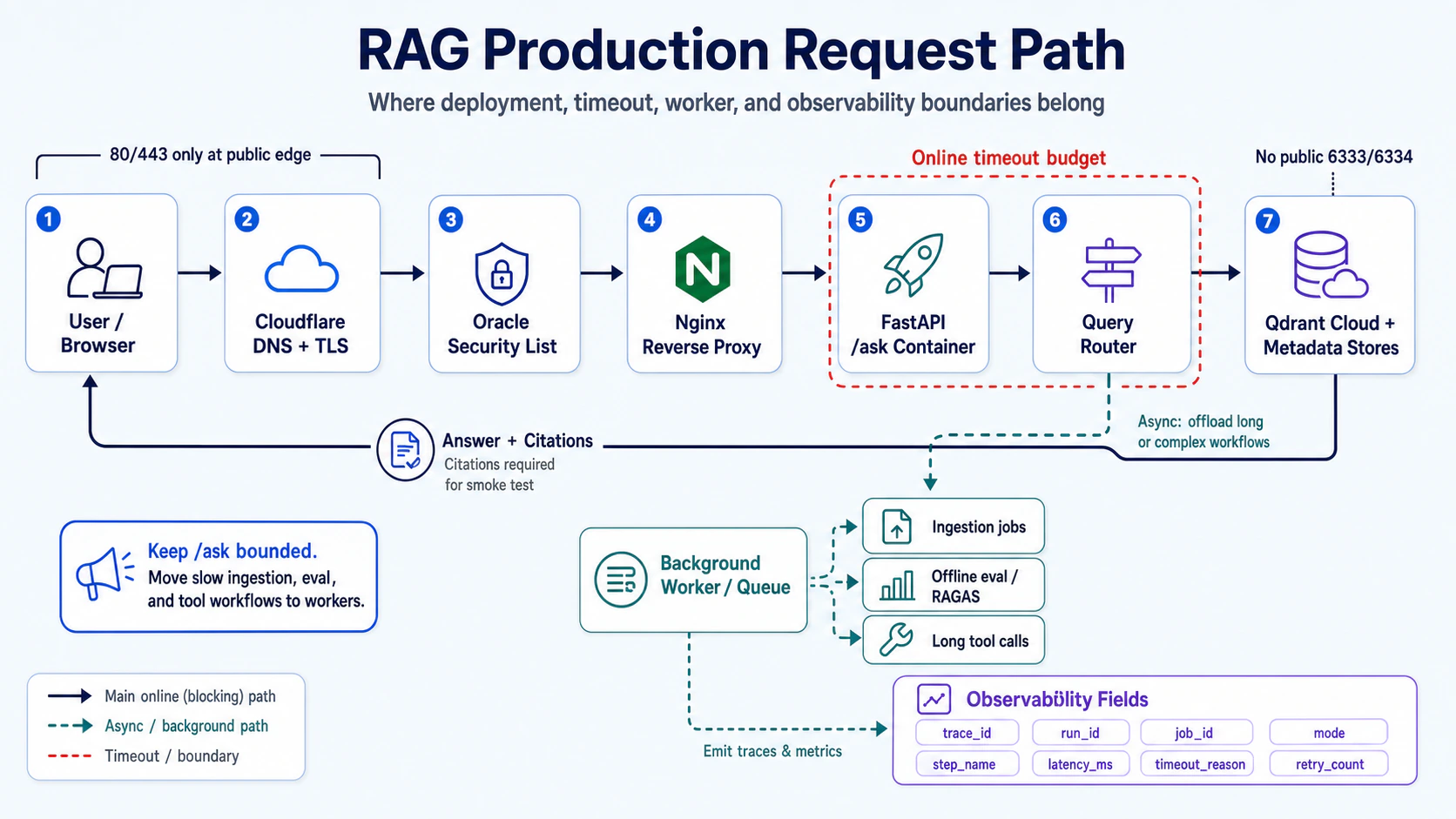
My rule of thumb: online /ask should only own the blocking path with a clear timeout budget. If a task has any of the traits below, it should not block the same HTTP request:
- It runs ingestion, chunking, embedding, or payload index bootstrap
- It runs RAGAS, offline eval, or a regression suite
- It calls an external tool with unpredictable latency
- It needs retries, human review, or may run longer than 10 seconds
- Failure cannot be reduced to a 502; you need job state and replay clues
I split the production path into two lanes:
| Path | What belongs there | Success condition |
|---|---|---|
Online /ask path | auth, routing, retrieval, rerank, generation, citation assembly | bounded latency, observable trace, explainable failure |
| Background worker path | ingestion, offline eval, long tool call, index bootstrap, batch regression | has job_id, retryable, status-readable, result can be backfilled |
The queue technology is not the important part. The important part is whether timeout, retry, and trace are treated as product logic from the beginning. At minimum I would record these fields on every request/job: trace_id, run_id, job_id, mode, step_name, tenant_id, latency_ms, timeout_reason, retry_count, cost_usd.
Part 07’s per-step trace, Part 08’s query modes, and Part 09’s ingestion queue become one deployment requirement: do not only ask whether the service is alive; ask whether each unit of work is bounded, recorded, and verified.
These Are My Choices, Not General Advice
These 4 choices are not universal deployment instructions; they are disclosures about why I chose this stack. If your conditions differ (budget, team size, data compliance, expected traffic), the conclusions may flip entirely.
Oracle VM (not AWS / GCP / Azure) I chose Oracle Cloud Always Free not because it’s the most stable, but because it’s free and the specs are sufficient for a small RAG API. The downside: unstable availability in popular regions, no SLA, complex documentation. If your project needs 99.9% uptime or your team needs better migration paths, this isn’t the first choice.
Qdrant Cloud (not self-hosted Qdrant / Pinecone / Weaviate) I chose Qdrant Cloud because I didn’t want to maintain a vector DB myself (backup, upgrade, monitoring all cost something). The downside: your data is with a third party, network latency is higher than local, costs scale with usage. If your data privacy requirements are extreme or your vector search volume is massive, self-hosting may be more appropriate.
Cloudflare (not direct VM IP exposure / not Certbot/Let’s Encrypt) I chose Cloudflare because I was already using it to manage my domain, and Origin Certificate setup is simpler than Certbot (no DNS challenge handling, no certificate renewal worry). The downside: you’re tying your entire DNS lifecycle to Cloudflare—if Cloudflare has an outage, your API goes down with it.
Docker Compose + L34 patches (not k8s) For this project’s scale, k8s is over-engineering. Compose + one VM is a reasonable fit for this single RAG API at its current scale. The downside: horizontal scaling has to be done manually, but this project isn’t at that scale yet.